Overview
In 2021, I transitioned from an embedded Senior QA to the sole UX Designer within the Core Technology Group (CTG) at Cloud Imperium Games in Los Angeles. I was responsible for a few different initiatives; however, my primary focus was the Star Engine Editor - which is the software interface that contains the tools which allow over 800+ developers globally to develop Star Citizen and Squadron 42.
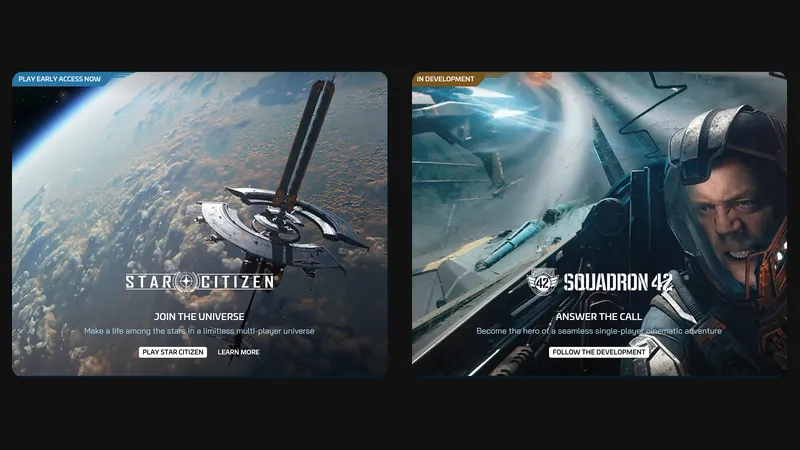
Over the course of 3 years, I stood up the group's user research foundations, documented technical issues within workflows, updated existing tools, and crafted new tools alongside my team of engineers and QA. I passed along developer feedback about bugs and friction points, then turned those issues into concrete action items for the team.
On this page, I will detail a few selected projects, spanning my 3 years on the team. Our struggles, our wins, and some specific musings.
If you're interested in more detail about the engine, you can read more on the Star Engine wiki page (opens in new tab) or go to any of the tech talks available on YouTube (opens in new tab).
Star Engine Editor
The Star Engine Editor was my primary focus - it wraps the game engine allowing developers to manipulate the game's features, create levels, its lighting, cinematics, animations and more for the two titles.
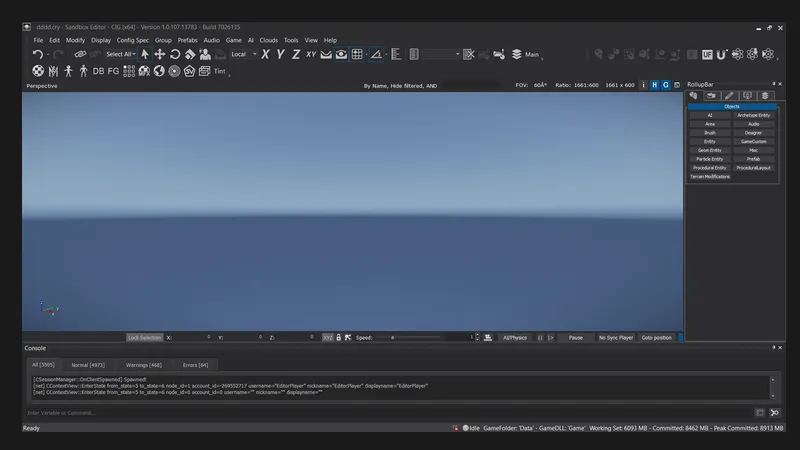
While the Star Engine is one of the most impressive game engines on the planet, the interface for the Editor is notably archaic in comparison. Some parts of it are built with Windows Presentation Foundation and other parts are another framework called QT. Years of ad-hoc changes have left the interface looking dated next to Unreal, Unity, and Godot.
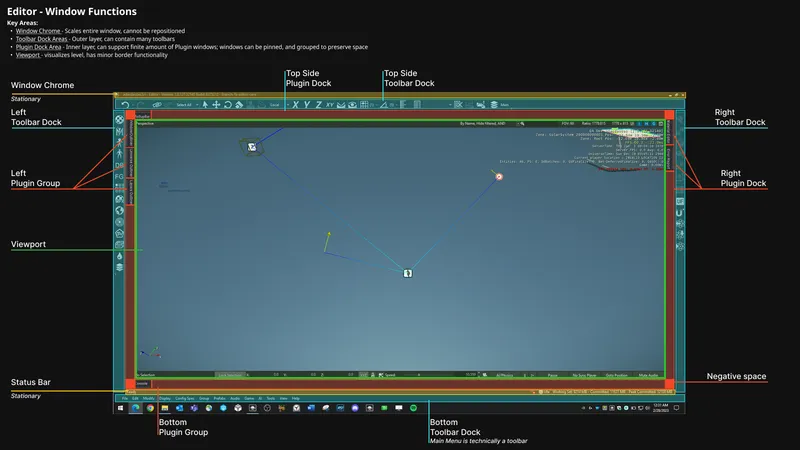
While I had spent some of my spare time conceptualizing an updated aesthetic to the interface - we sadly did not get to implement it. My focus throughout was primarily in specific tools. The overhaul would have taken considerable time away from core tools and fixes.
Below are some of my concepts.
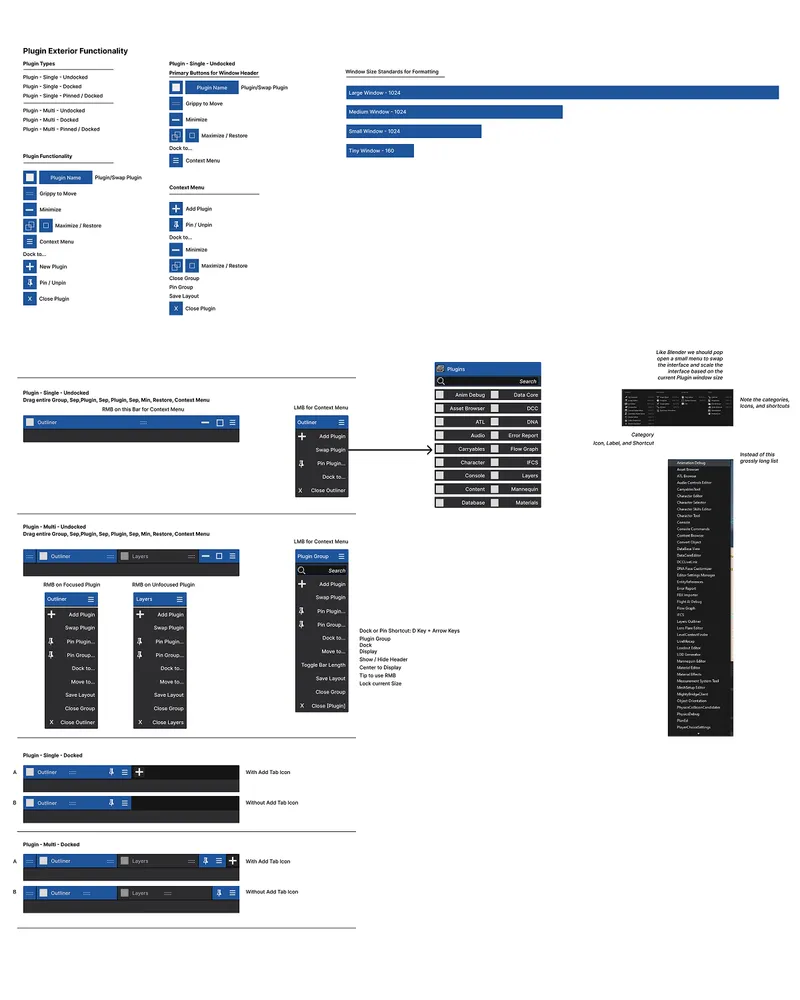
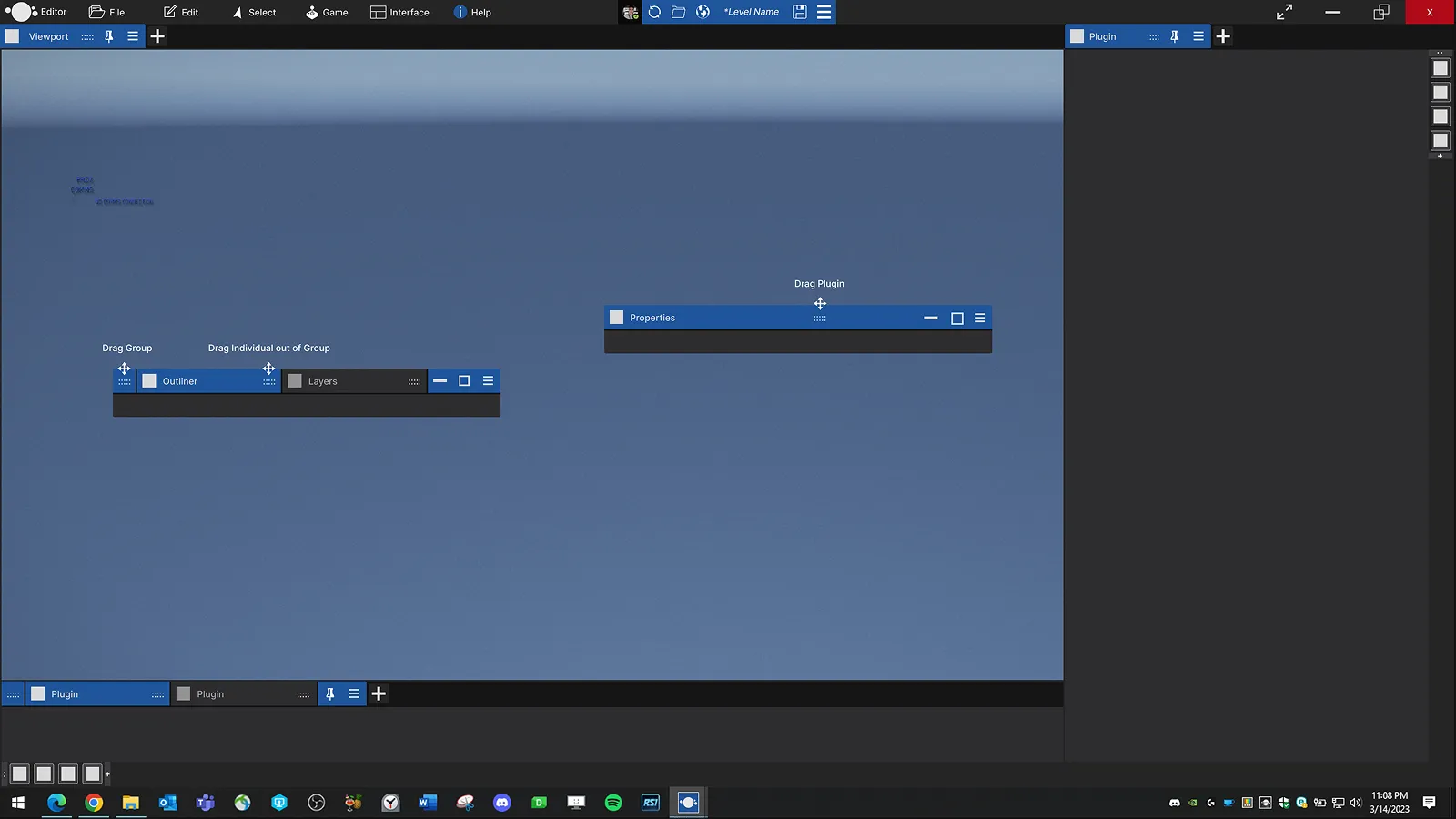
UX Maturity
I transitioned to this role at the beginning of the Covid-19 global pandemic. I was fortunate to be able to work from home and to be alive.
My team was mostly based in Germany, so I joined their end-of-day meetings. Since I wasn't commuting anymore, I could stay up later to meet European developers during their morning hours. Exhausting as that was sometimes, it was worth it just to meet new people and learn about their issues.
As I had no UX Lead, I was going to need external help. I applied for a mentorship program on the Games User Research site, got a mentor, picked up a copy of the Games User Research, and made use of a friendly cross-tech tools-oriented developer community - 'The Toolsmiths'.
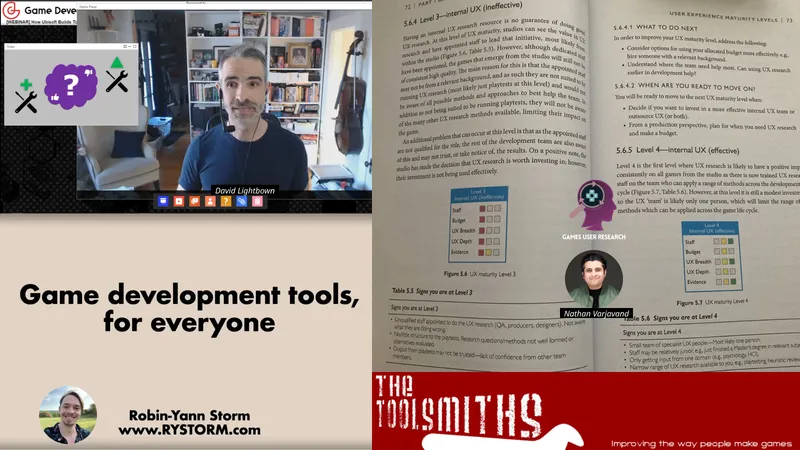
Chapter 5 of the Games User Research Book (opens in new tab), titled, "User experience maturity levels - evaluating and improving game user research practices" - Game Vision - Graham McAllister (opens in new tab) details maturity levels of organizations and provides criteria to help define where you are and where you can go based on your resources.
With my hiring, the Core Tech Group had gone from Level 1: Do not do it - to Level 2: 'Have a go'.
My goal based on resources was to get us to Level 4: Internal UX (effective) and I believe during my time I managed to do that.
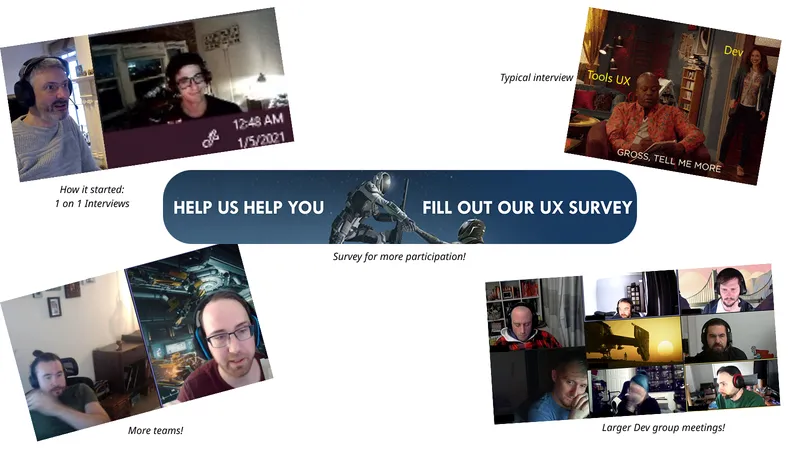
At the beginning I was doing my best to translate much of what I used for QA playtests, while leveraging my available tech stack.
Tasked weekly with meeting team leads and their associated members within the Core Technology Group, I was interviewing developers from all studios via Microsoft Teams, and making notes in Confluence and Miro.
Interviews ran 30 minutes to an hour. I'd ask about the tools they used, what they were working on, and the problems they faced with the Editor.
That first year was filled with many ups and downs. I did my best to be present, listen, learn and document my observations and present them to my team. That’s what I did, and over time I built trust amongst the developers as the team tackled their issues, and I grew a more formal process.
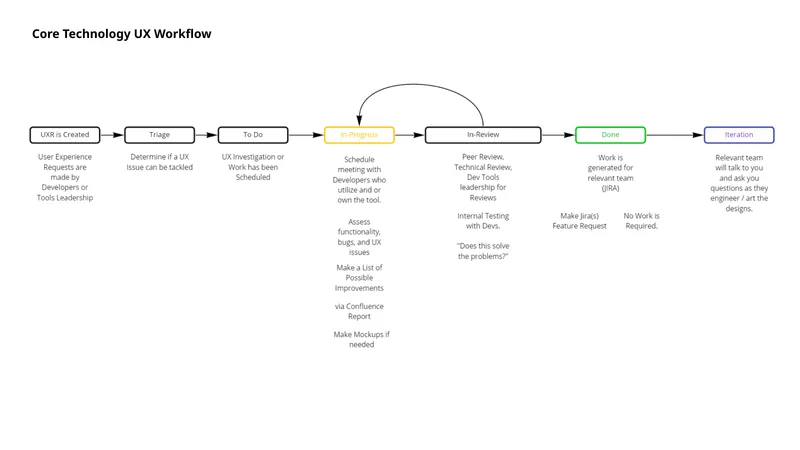
Our Internal Setup:
- Production provides UX with a Task with associated Tool and Power Users
- UX sends a meeting invite to the point of contact developer
- Meet and Greet to establish major talking points
- Screen Share and Record workflow via OBS
- Transcribe audio using Otter
- Synthesize my notes into reports
- Chat with my team about the issues
- Make action points via Jira Tasks
- Send Surveys if there is a need for Quantitative Data
These meetings and projects provided the Editor team notoriety among the other internal studios, eventually garnering enough of an interest among developers where we saw tons of developers wanting to participate.
Fixing Communication
Most any time a new hire came through the office, many would struggle adapting. The editor feels unfamiliar to developers coming from Unity, Unreal, or Godot, which offer more modern, up-to-date documentation.
Internal Star Engine Editor documentation was sparse and the documentation we had was team specific documentation. Some were better than others, but most were decentralized in their specific team's corner of Confluence, which meant developers had to dig to get information.
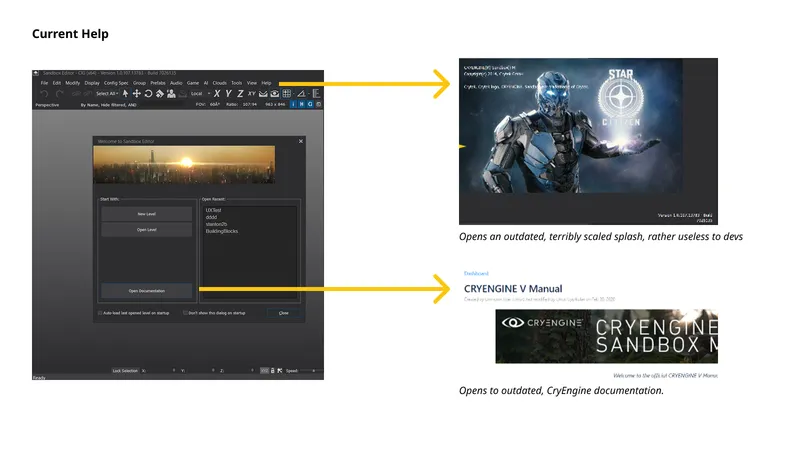
Another much too common feeling among developers I gathered in interviews was the lack of communication with the Editor Team. They felt cut off and didn't know who to contact. The Editor Team was a small group within the Core Technology Group and no one was really the public point of contact.
Worse than that - if they encountered bugs, crashes, or UX issues - they rarely reported or recorded them. Developers have this mindset where they MUST KEEP GOING SKIP DON'T READ JUST FIND A WORKAROUND - which is bad. That was made worse because there wasn't any obvious method to triage these issues to the Editor Team's Engineers or QA.
Solution
I saw the opportunity to create a much needed communication loop for developers:
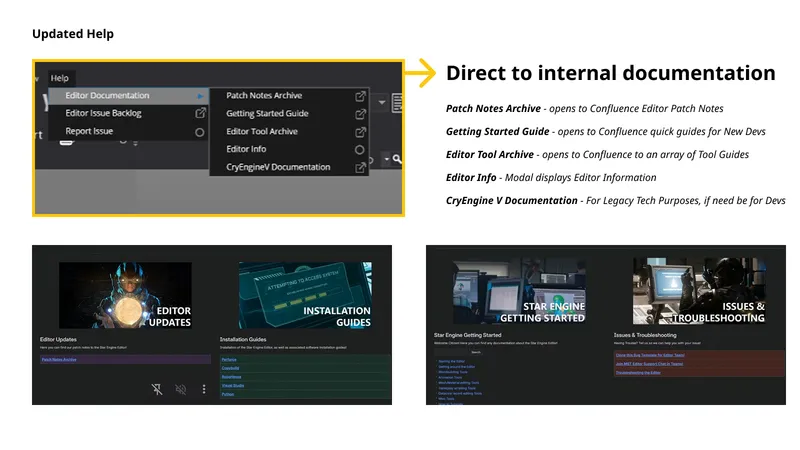
- I created a centralized Editor HUB for general use, documentation, updates, troubleshooting guides, etc
- We created a Teams Channel for direct Editor Support
- We created a Patch Notes Archive and Published Patch Notes regularly
- Integrated a Patch Notes modal that appears on startup after updating to latest
- We put a link to all of these within the Help Menu of the Editor
- Later, every new tool was required to include an information button linking to documentation.
Outcome
- Developer engagement increased as I became a bit of a spokesperson.
- Reports of issues increased in the Teams Channel, QA reproduced the issues, engineering fixed more issues, and stability increased.
- New Developer on-boarding was improved, and we even increased tool fluency among veteran developers by surfacing old but useful functionalities.
- Developers felt like they were finally heard.
The importance of assuring a solid communication loop was the single most important aspect of my time there.
Base Builder
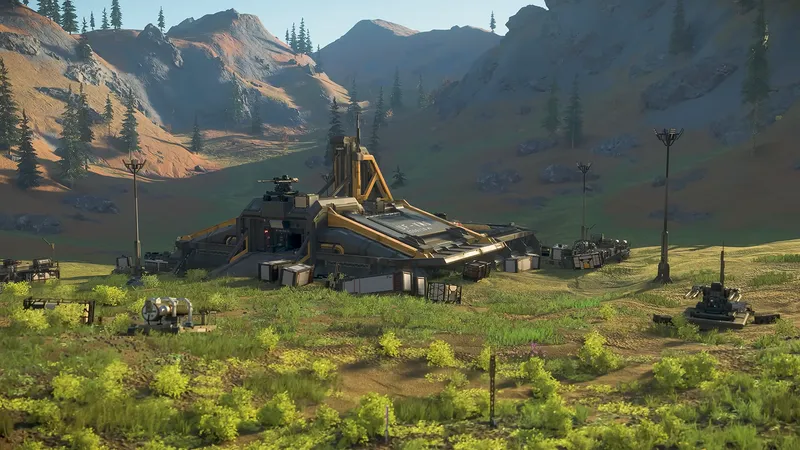
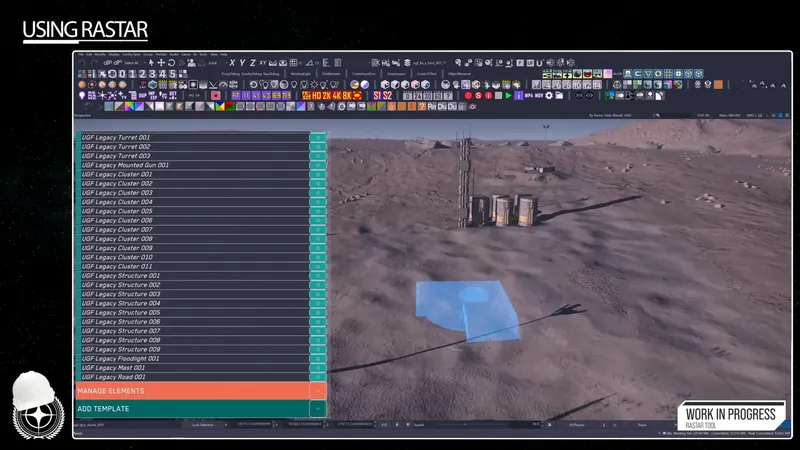
Near the beginning of my joining of the Core Tech Group, I would be asked to join a prototyping team for a Base Building tool, referred to as RASTAR. It was meant to speed up the Level Design and Environments workflow for constructing spaces on planets throughout the Persistent Universe. I was responsible for both concept design and UI implementation using their internal tool called, Dataforge. This tool allows developers to create many of our in-game classes and game objects as well as our interfaces.
I was having fun on the base-building tool, but it became too much. I was still expected to keep up my main Editor Team duties — the reason I'd been hired — and I couldn't do both well. My implementation was also poor, I was creating new components from scratch, and not utilizing component libraries established by the UI team. I decided to leave the project after discussing my issues with my lead.
Outcome
As this was early on, I'm glad it served me to know when to say ‘no’ to a project even if it’s interesting to avoid taking on too much to the point where all my work suffers.
There was however some valuable data gained for the UI and Editor team:
Our Editor Viewport - which primarily acts as a 3D render window of the level a developer has loaded - was not really performant with the interface setup we had as well as some other UI interactions for the player controller.
During development, the UI team and I would notice even in sterile test levels - the UI when used would lose fps during specific interactions. I would report these issues and provide performance traces. We were able to find resolution scaling and specific mouse and keybinding behavior bugs and fix those to make the tool and other play-in-viewport experiences better for developers.
Editor Settings
As I was auditing the editor - I would note different workflows as well as developer struggles with display settings with the Viewport. Below I note major issues and what we did to tackle these issues.
Tangled
The Editor Settings were all over the place and I mean that very literally. From duplicate shortcuts with different labels to buttons that had no functionality at all in the literal settings menu. No tooltips, descriptions. It was a mess.
Developers also relied on pre-launch json config files full of debug commands they found over the years. These commands would allow the developer to display specific debug visuals for their workflow which would appear in the Viewport.
These commands would also sometimes cause developers to skip crucial Editor Prompts which would have aided them and submit changes that broke builds or tanked performance.
Teams passed these config files down informally, from one lead to the next, with nothing written down in Confluence or in the Editor itself. So during interviews, I would collect them and archive commands, and if possible, I would detail what each did, and if there were bugs, or perhaps something we could do to surface these functionalities for general use.
Performance
Our Single-player and Multiplayer Levels, and Tech Zoos are populated with hundreds, sometimes thousands of objects. Each object in the engine receives visual “helpers” which could be Toggled (Show/Hide).
The viewport then gets cluttered quickly and obscures Gizmos and other objects in view. Developers lose focus of what matters and performance would drop.
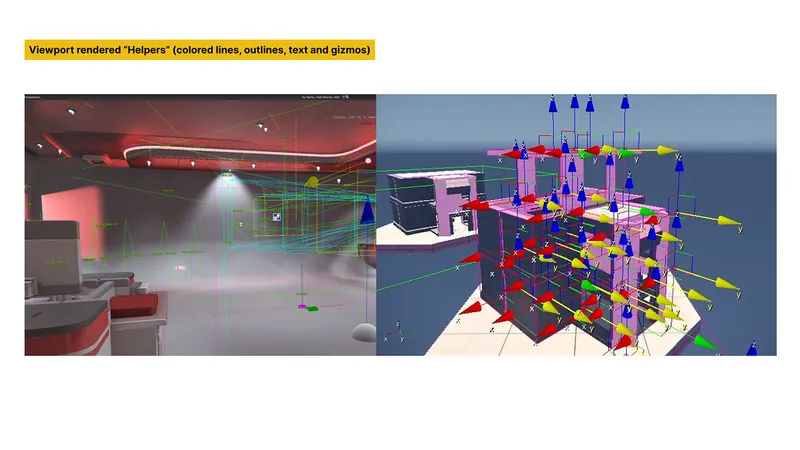
I audited every Editor Settings menu — scaling, text, viewport options — and labeled each item functional, redundant, or bugged. That list became our refactor plan.
We also assessed a variety of workflow json files and the commands within as we wanted to see the general commands used by most teams, as well as some more obscure commands which we could surface and support within the Editor Settings.
And finally we created a new searchable window which houses all Viewport Visualization options at the top of the viewport which runs parallel with our new Editor Settings Menu.
Outcome
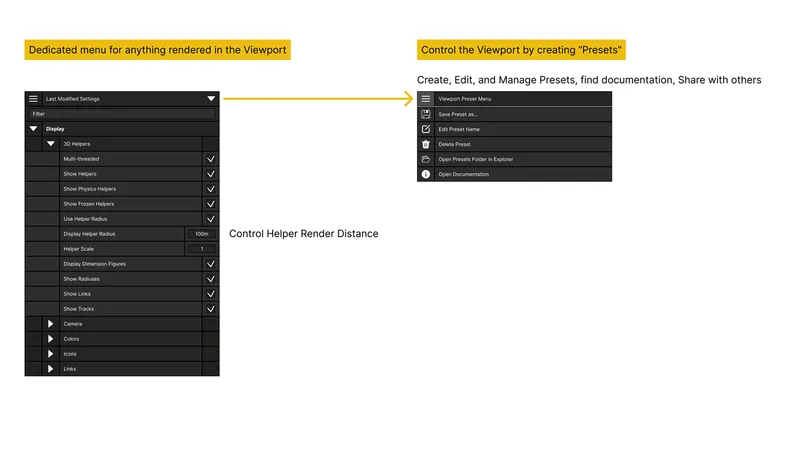
This was a win for all developers, as they could easily find, filter, and manage what is currently displayed in their Viewport.
- We improved general performance by refactoring the ways we rendered specific visualization helpers
- We improved the surfacing of methods to control render distance for general and specific helpers
- And because sharing is caring - we thought it useful for developers to be able to create and share “Presets” configuration json files with one another.
- A user can create multiple visual environments, rather than a singular one they have to manage each time they need to change a workflow.
For example: We have two developers from Cinematics. One needs to set up framing for different shots - and another needs to ensure framerates are consistent throughout.
Each developer can set cinematic presets, name them, share them, and the user can toggle between the two.
Object References
At this point in time, the team's notoriety had grown and we received a message from the Single-player Level Design Team from our team's Technical Director. They actually had prepared a pitch for a tool, and had gathered a large chunk of the information and provided example screenshots and Levels for us to test with.
One of the most serious problems a game developer can run into is data corruption. This can happen in a few ways from Bit rot, truncation, scheme mismatches, buffer overflows, maybe some race conditions or asset errors. Different engines handle this inconsistently — some give users enough detail to understand what went wrong, and some don't.
For this particular project story we were dealing with Broken / Missing References which were causing levels in the Singleplayer to crash immediately with Null Reference Exceptions, resulting in developers wasting time investigating and fixing a previous fix.
Delete this? Y/N
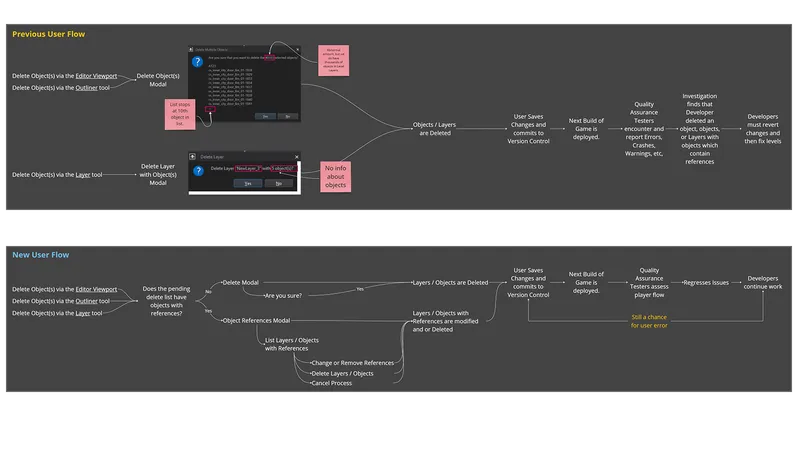
For about 10 years, the Editor's Delete confirmation didn't warn users of a key risk. If you pressed Delete on an object, the dialog never said that object was referenced elsewhere.
Worse than that, the modal only displayed a finite amount - 9 game objects - in the list and would truncate. In the example sent to us, one developer was attempting to delete 40,000 game objects. But the modal is small, and only showed 9 of 40k. Rather insufficient, wouldn't you agree?
It was one of those situations where we all sat back in our chairs and felt a mix of anxiety and comedic surprise.
“How have we managed for this long?” and “Why are we laughing about this?”
It ended with us all agreeing this was high priority and we got to work straight away, investigating the feasibility based on the specifications presented by the Single Player Team.
What we did
- Developers we worked with had a very detailed breakdown of the problem and what they wanted in an interface as well as some core features.
- With my team, I surfaced the remainder of the user flows pertaining to the Delete interactions, making sure we have “safety checks” in key areas.
- We modified the existing modals and created a new window which would present itself if there were any objects in the pending delete list which contained references.
- In the new window, we present users with Large Warnings, a dynamic table listing objects, their Layer location, and the references attached.
- Once selected, we provide options for resolution.
Outcome
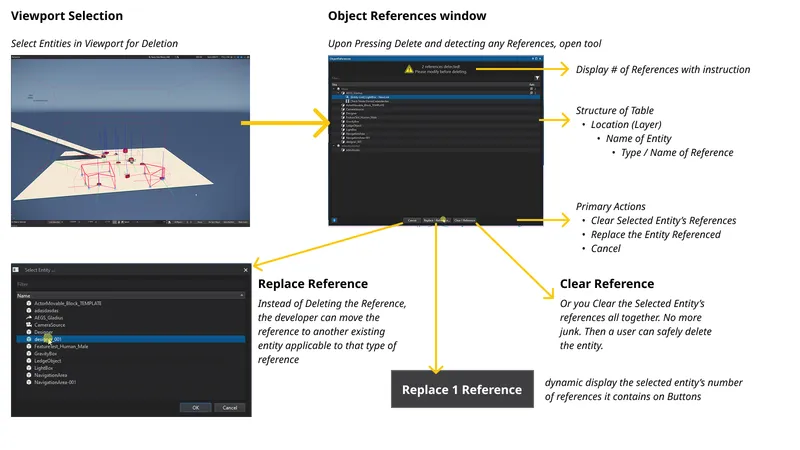
Once we shipped the new window, developers called it "a godsend," and level decay dropped sharply as the tool spread to other teams.
This project, I do believe, was successful in part for two reasons:
- We had been successful with other projects during my time there, and were public about our desires to tackle problems for developers all over the globe.
- Because of this, the developers sought out the correct channels, and had a plan in motion already to tackle the issues they faced, which reduced the time it would usually take to implement.
Update
Since 2023, the engineering team has continued building on the tools foundation to Warn a developer before costing the team serious time and effort. My former Technical Director and I caught up recently and he provided me with some data on the tool's use and growth since my departure:
- Light links added as a tracked reference type, letting lighting artists check whether an object is being referenced
- A non-destructive inspection mode for viewing references without deleting, plus a right-click "Open Object References" option for faster, at-a-glance access
- Improved detection and cleanup for Trackview cinematic references
- Attached entities, AIGroup members, and area shapes now register as references
Telemetry was added in April 2024, giving a picture of how the tool is used today:
- 1.69 million pane opens since telemetry started
- A steady 55,000–75,000 opens per month, peaking at 98,500 in a single month
Caveat: this only counts the pane opening, not the outcome. The Replace, Clear, and Delete All buttons aren't instrumented, so there's no "references caught" or "deletes prevented" figure - and telemetry only goes back to April 2024, so there's no pre-tool baseline either.
We don't have a number for incidents prevented, since we never built tracking for that outcome. The team still uses and extends this tool nearly two years after I left the project. That's real evidence the original approach worked and solved a lasting problem. It was one of the more significant projects I worked on at the time, and I'm glad to see it's become a lasting part of the editor's infrastructure.
Conclusion
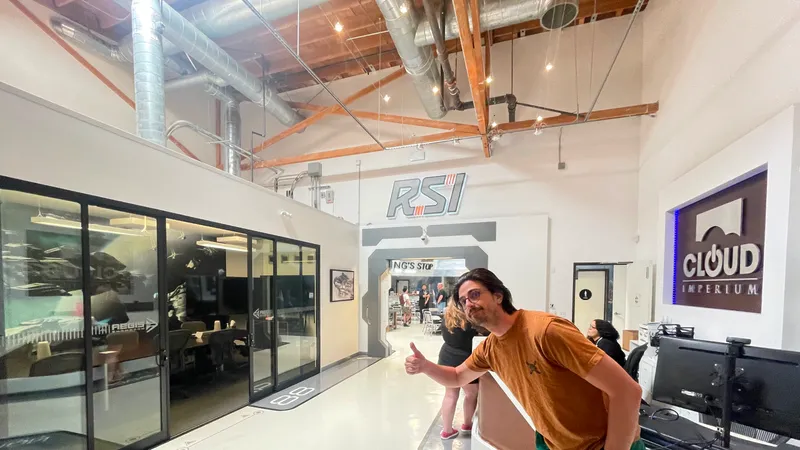
For three years, I worked with a great team who supported and trusted me with an entire editor and global team pipeline. Unsure how many first time UX roles get to do that, but what a ride it was.
Being the sole UX developer was difficult, but it was made less difficult due to crucial internal and external support. I am grateful to my senior tech leadership for giving me a fantastic opportunity, teammates, and producers who were my support pillars throughout my time.